Category: Planning and research

  • The Effectify Way – Planning your software development project

    The Effectify Way – Planning your software development project

    Effectivity through good processes

    Every day many employees and businesses use complexity as a way to hide issues and unprofitability. .

    One should never be dazzled by complexity.

    The Effectify way is, as the name suggests taken from the Toyota way. It’s about optimising the process and simplifying what we have to have better performance and make something more usable.
    Our approach

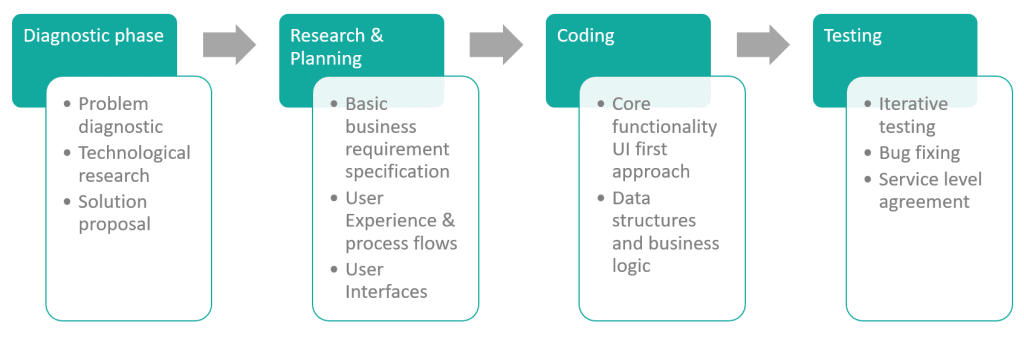
    The SDLC and problem solving

    Though the software development life cycle is cyclical, it very often happens that the clients prefer to hand over the maintenance of the solution to their own team or hire their own software developer to maintain it.

    For this reason, the process below is linear.

    The Effectify Way focuses on solving customer issues.

    Once a problem is defined, it’s only a matter of time until it is resolved.

    As it’s important to find, define and solve the problems long before the coding starts, the focus is placed on research and understanding the problems involved.
    What if the uncertainty is too great?

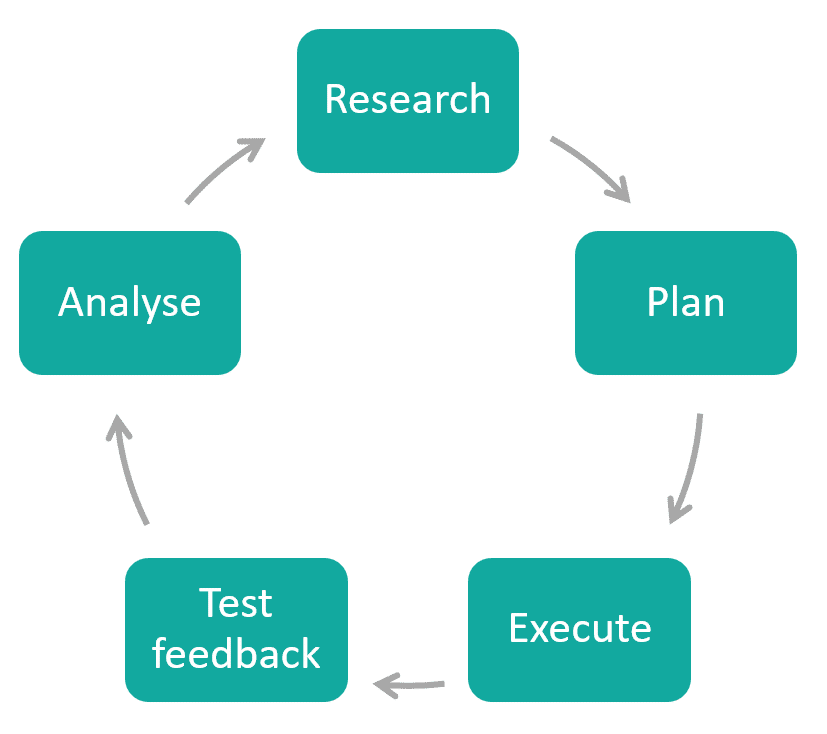
    In certain scenarios, a problem cannot be defined as easily as the above. For example, a startup functions under extreme uncertainty.

    Though many problems can be solved, one needs to solve only relevant problems. This needs to happen in bite-sized chunks.

    As the answer to the current problem could determine the next question/problem to solve, it makes sense that a linear approach would be unproductive. A cyclical approach would be appropriate for businesses that have a high level of uncertainty.

    Each iteration identifies the next question that needs to be asked. Once the question is identified, one can execute a test to receive the next answer.
    Should my project be linear or cyclical?

    Depending on the client needs, either one of the two approaches can be used.

    To avoid the deadly spiral of over-engineering, it is wise to use certainty as the gauge for the decision.

    Once the diagnostic phase has been completed, the appropriate approach would surface.

    The diagnostic phase

    Before any coding or work starts, we prefer doing a diagnostic phase.

    It’s important that we understand the problem that we need to solve.

    For example, a client is looking for API integration with all the major phone networks. He hasn’t inquired yet about existing APIs and current functionality. If this is part of the core functionality, this dependency could determine the success of the project. It would be irresponsible to give time and monetary estimates unless this has been unpacked.

    It’s definitely not ideal to start a project and halfway into the project it is discovered that the timeline moves out with 6 months, or that the vital integrations do not exist.

    Research and planning

    Once the diagnostic phase has been completed, one is able to give timelines and cost estimates for the work that needs to get done.

    Once the research and planning phase has been completed, a research document – a business requirement specification (BRS) will be delivered to the client. This is very similar to a business requirement specification, and developers can use this as a base for the coding that needs to be done.

    In the diagnostic phase, the technical aspects such as API integration, third party requirements and the appropriate platform has been fleshed out. In the research and planning phase, the appropriate system and code architecture needs to be considered.

    The research and planning toolbox

    Technical and code approaches
    • Appropriate technology choices
    • Architecture choices
    User Experience
    • Personas
    • Needs analysis
    • Process flows
    • User stories
    User Interfaces
    • Corporate identity and branding
    • Low fidelity mock-ups
    • High fidelity mock-ups
    • Icons

    In the research and planning phase, the user experience research and user interfaces are also included.

    To understand the user better, the Effectify way does a needs analysis (which could take the form of interviews, data tracking and collection of relevant information). From the information gathered, personas are created, followed by process flows and user stories.

    Execution – coding the solution

    Once the blueprint is in place, the execution can start. The blueprint will dictate the following:

    • the technology used – including coding framework, language and architecture
    • the platform (mobile, web, desktop application, cloud, etc)
    • third party integrations and external technologies leveraged

    We believe in a UI first approach to get more client feedback earlier in the software development lifecycle. If one can see how a solution will look and navigate, the code logic can be set up accordingly.

    It’s also important to supply weekly updates so that no one is out of the loop about where the project is and where it’s heading.

    Testing and feedback

    It’s worth noting that any company that claims that they write bug-free code needs to be avoided. As humans are involved, bugs are bound to creep in. For this reason, the Effectify Way avoids the ‘big reveal’ at all costs and does small incremental releases so that testing starts early in the process.

    Though unit test coverage for code is vital for code stability and trust, it’s also important to do negative and functional testing.

    Conclusion

    The Effectify Way is about simplifying processes.

    When someone uses software written by a developer, it needs to work.

    More importantly it needs to be used – it needs to be relevant, easy to use and viable.

    Simply put, it needs to be effective.

  • Deciding on your technology, frameworks and  architecture

    Deciding on your technology, frameworks and architecture

    The example of Flash

    Adobe Flash has been around for a number of years. The technology allowed for animation, drawing of vector graphics and excellent interactivity in the age of Web 2.0. Many companies built their systems on this platform using ActionScript.

    Sadly, Apple decided to not allow Flash to run on their mobile devices. 

    Android soon followed suit.

    Software development trends follow the consumer – and flash perished in the process.  

    The options are endless

    According to Ray Kurzweil, computers double their capabilities every twelve to eighteen months. Coding and information technology follow suit. We see advancements in cloud computing (such as Azure) that constantly pushes out new features and new coding languages that makes the tech stack of today look outdated. 

    Businesses tend to choose their developers carefully. They put them through rigorous tests, white board problem solving and interviews. Sadly, most startups and  small businesses don’t actually choose their technology, architecture and coding frameworks in the same way.

    It is therefore important that we have a careful consideration when choosing the tech stack and architecture for a solution.

    Without further ado, let’s jump into the definitions and examples.

    Requirements

    If you only have a hammer, every problem looks like a nail

    Taking time to analyse client requirements will assist in making an informed decision in making the right technology decisions. It’s worth taking the time to investigate the pro’s and cons of a few different technologies. 

    For example, a client might require a website that needs ot be updated regularly for their business. As this is not a large component of their core lead generation method, it would not make sense to have a custom web application developed. It would also not make sense to get a developer to regularly update the website on their behalf. Though it might be frowned upon, for something so simple it might be worth using WordPress.

    Some clients require a custom solution with API integrations, custom business logic, data warehousing and machine learning. 

    The technologies used for this will be much different. 

    Frameworks and languages

    Software developers have an array of languages to choose from. Some are widely used, others are specialised. Here are some examples of languages and their strong points:

    • Python tends to handle spatial and geolocation well.
    • C# and Java have big companies backing the technology and tend to be used for business applications
    • JavaScript and TypeScript are used in web applications to make the web application more responsive by having a certain amount of business logic in the browser.  

    Coding languages have frameworks that can be used to accelerate development. A framework contains pre-written code with functionality that is often required in developing solutions. 

    • C# and VB.NET use the .NET framework
    • PHP uses Symfony and Laravel
    • Javascript uses JQuery and Angular

    Technology stack

    Technology stack: a tech stack refers to the full stack of technology that is used to create software. Here are some examples of the most well known stacks:

    • Microsoft stack (.NET Framework with C# of VB.NET, SQL Server) – This stack is trusted by businesses as stable and accurate, as Microsoft is backing the technology.  
    • LAMP stack (Linux, Apache, MySQL and PHP): This is often used as a more cost effective alternative. As the whole stack is open source. The developer has a lot more control over settings and the finer detail.

    It’s noteworthy that these stacks aren’t clear cut. You could, for example use C# .NET with RavenDB. This flexibility allows for companies to have a more flexible solution that suits their needs. 

    Solutions and software architecture

    Software architecture has to do with how the code is structured and strategic optimisations (performance, maintainability, stability). Code could either be optimised performance, making it more extendable, maintainability. 

    It can never be optimised for everything at the same time. 

    Solution architecture has to do with how the software solutions will interact and how the systems will communicate with each other. When starting a new project, the whole ecosystem needs to be understood. This will avoid unnecessary duplication of information, issues in systems integration and reporting problems.   

    Platforms and external services

    It’s worth noting that with the growth of cloud computing, AI, machine learning and mobile applications that the above needs to be considered in the scope of the greater vision of the company.

    As we have learnt from Flash, It might not be in your best interest to grow your business on a technology, service or external party in the long run. Yet, large companies like Microsoft and Amazon have a strong move to digital transformation. These technological giants are enabling business to move forward with them by using Azure or AWS – cloud based solutions.

    Mobile, web or both?

    Web technology has matured well over the last 25 years and the frameworks and languages have adapted to cater for browser incompatibilities and slow connection speeds.

    As mobile apps are still a fairly new channel, it’s not at the point yet where there’s a widespread adoption of a main software development methodology and technology. This fragmentation can cause issues in finding developers to develop features or maintain an existing app. 

    For example, PhoneGap, Flutter and Xamarin do publish cross mobile, but there are a lot of native developers that develop specifically for Android or iOs. If we compare this with how jQuery/Angular as the main trending technology for application front ends, it does call for investigation. 

    For startups, it’s often not wise to go all out and have a cross platform mobile app and web application at the same time. This might cause over-extending. For a large corporate it’s important to have a presence and often to have mobile apps on Android, iOS and the newest platforms.

    Other considerations

    Other considerations:

    • Testing: do the technology choices allow the tester or end-user to test the process thoroughly before releasing, or do I need to trust the word of the developer?
    • Incident handling: Am I able to become aware of issues before they become an incident? How will this happen?
    • Scalability: will the technology allow for scaling the business? For example, document databases are cool, but start becoming slow when doing complicated index queries on hundreds of millions of documents
    • Security: Will my solution have the necessary security in place and adhere to legal requirements? Does the chosen technology allow for this?

    Conclusion

    When developing a new green fields solution, one needs to consider the language and frameworks, technology stack and architecture. 

    These decisions could affect performance, reporting, cost and  future expansion.

    Do sufficient research.

    Chat with a specialist to confirm that you’re on the right track.

    Don’t over engineer.

    Simply be effective.

    Sources consulted