Category: Software development

  • Scheduling location tracking tasks in the background with Xamarin Forms on Android

    Scheduling location tracking tasks in the background with Xamarin Forms on Android

    Android and background tasks

    Android has started to change how background tasks are run. For security and battery life, many new android phones are changing the length of background tasks to terminate within a few seconds of running – killing the desired result. The intention is that apps don’t run things that the user is not aware of in the background. 

    Imagine apps mining bitcoin in the background!

    Possible solutions and options

    As mobile technology is not nearly as mature as the web, it can be complicated – even for simple tasks. One would think that if you want to do a task without the user knowing, that you would need a background task – which is not necessarily the case. The operating system (OS) can kill a background service silently if it deems it unnecessary, processing heavy or doesn’t like it. For recurring tasks, this makes the background service a no go.

    A foreground service did seem like the next best option. This is a service that runs in the foreground – i.e. there is an icon and a sticky notification that displays. The issue is that pure “handle in the background” tasks are now active and visible.

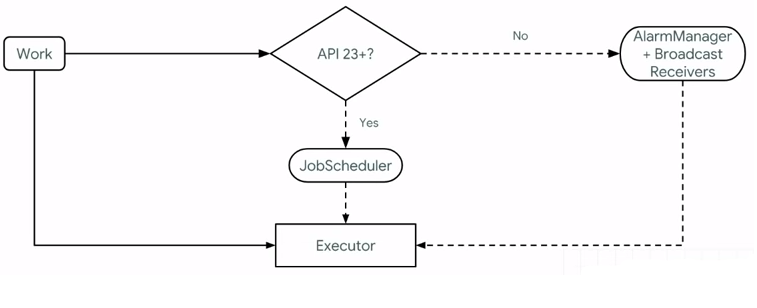
    With previous versions of Android, the AlarmManager and Broadcast Receivers work on older devices, whereas API 23+ implemented something called the JobScheduler. This allows us to schedule jobs to be executed. Though you can schedule periodic jobs through the WorkManager, the OS can kill it.

    So, using the WorkManager, we can get around this. The WorkManager allows us to create a worker that can run to do a task. Before this completes, we are able to reschedule another event that will allow the worker to execute. 

    The WorkManager

    The Android WorkManager is a library that manages tasks, even if the app exits or the device restarts. It manages this by wrapping the JobScheduler, AlarmManager and BroadcastReceivers all in one. Jon Douglas explains it like this on his Microsoft dev blog:
    Permissions

    The following permissions are needed to track location:

    • ACCESS_FINE_LOCATION – this is for getting the location
    • ACCESS_COARSE_LOCATION – this is for getting the location
    • ACCESS_BACKGROUND_LOCATION – if you need to access the location in the background, you need this permission for Android 11 (API level 30) or higher.
    • FOREGROUND_SERVICE – this will allow the app to run the service. 

    Technical requirements

    For this post, we need to have an Android foreground service and use the WorkManager to handle the scheduling. You can use any of the following libraries:

    Architectural code overview

    Shared Library / PCL Project calls

    We need several things to make this work. The first would be to get something to start the job schedule from the shared library/PCL project:

     public interface ILocationWorkerService
    {
    void StartService();
    void StopService();
    }

    This will be called with dependency resolving as below. Please make sure to register the dependency in the main activity!

     DependencyService.Get<ILocationWorkerService>().StartService();

    Worker Service

    In the Android project, we need an implementation of the interface above, with some place to schedule the worker. I use the name LocationWorkerService, as this is not the worker yet. The Worker is called the LocationWorker.

    public class LocationWorkerService : ILocationWorkerService
    {
    private static Context context = global::Android.App.Application.Context;
    public void StartService()
    {
    OneTimeWorkRequest taxWorkRequest = OneTimeWorkRequest.Builder.From<LocationWorker>()
    .SetInitialDelay(TimeSpan.FromSeconds(30)).Build();
    WorkManager.Instance.Enqueue(taxWorkRequest);
    }

    public void StopService()
    {
    SmarTechMobile.Helpers.Settings.TrackingIsActive = false;
    }
    }

    The Worker

    For the worker, we implement the Worker Android-specific class. The code to do the location tracking has been removed here, as links will be supplied further down below.

    The code below should run the job repeatedly, every 30 seconds. You might want to add special conditions, such as in the YouShouldResechedule variable – and I recommend doing so, as waking up the device every 30 seconds can be taxing on battery life.

    public class LocationWorker : Worker
    {
    public LocationWorker(Context context, WorkerParameters workerParameters) : base(context, workerParameters)
    {

    }
    public override Result DoWork()
    {
    try
    {
    var YouShouldRescedule = true;
    if (YouShouldRescedule)
    {
    Reschedule();
    }
    }
    catch (Exception)
    {
    Reschedule();
    }

    return Result.InvokeSuccess();

    }

    private static void Reschedule()
    {
    if (SmarTechMobile.Helpers.Settings.TrackingIsActive)
    {
    OneTimeWorkRequest taxWorkRequest = OneTimeWorkRequest.Builder.From<LocationWorker>()
    .SetInitialDelay(TimeSpan.FromSeconds(30)).Build();
    WorkManager.Instance.Enqueue(taxWorkRequest);
    }
    }

    }

    Location Tracking

    There are quite a few libraries that allow for location tracking, and thus it wouldn’t make sense to discuss all of their implementations in detail. I do want to list them with links, so that you can explore them:

    The Geolocator plugin was merged into Xamarni Essentials a while back, but it still has some background features that Xamarin Essentials lack. Both are really good though! I use the one by James Montemagno. The location can be called by the following in the worker:

    var locator = CrossGeolocator.Current;
    var position = await locator.GetLastKnownLocationAsync();

    Please make sure that you have all the permissions sorted – anything that happens in the background will fail silently if no permissions were granted.

    Conclusion

    Location tracking can be complicated. Be careful though – it is recommended that you don’t use it because it’s a nifty feature – the Play store might decline your app if you don’t have a purpose for it. As stated on the documentation:

    Note:The Google Play store has updated its policy concerning device location, restricting background location access to apps that need it for their core functionality and meet related policy requirements. Adopting these best practices doesn’t guarantee Google Play approves your app’s usage of location in the background.

    The message is this: use functionality with care.

    Enjoy your business! 

    Sources consulted

  • Search Engine optimisation for .NET Core  MVC

    Search Engine optimisation for .NET Core MVC

    SEO and .NET Core

    SEO is an art and a science at the same time. Historically, it has not really been in the sphere of software development, but web design.

    When a business grows beyond the normal WordPress website into a large web application, the line between the search engine optimiser and software developer becomes blurred – as does the responsibility.

    Though I do not deny the importance of SEO factors such as back links, domain age and content optimisation, we need to consider the technical aspect of SEO and code. 

    That is the purpose of this article.

    Issue tracking and fixing of SEO issues

    We know that page speed affects SEO, yet finding the issues that affect performance can be challenging. At the lowest level, one can use Google Page Speed Insights or GTmetrix to understand the page speed issues. 

    Monitoring where the slowness is happening will give you a better understanding. This could be done by custom code or by using Azure Monitoring.

    Chrome Developer Tools (I call them the F12 tools) also has a great interface for checking performance. This can be accessed F12 > Performance > Record. Refresh the page, and you will receive loads of info about the FCP, LCP and the response times of scripts. 

    Infrastructure factors affecting SEO

    Before we get into the detail of MVC and .NET Core applications, I want to mention that page speed and responsiveness is exceptionally important in upping your SEO score. 

    I find that many companies like to have a custom setup of their system on a virtual machine – often running databases, web applications and third-party services on the same machine. Though this might make sense, the performance of the website could be affected due to a spike in website traffic, SQL jobs and other factors. 

    In certain cases, the use of cloud services such as Azure or AWS might make the website performance better. These services are optimised for performance (replication and redundancy)  stability (scalability). Examples include Azure web services and Azure Elastic

    Code factors affecting SEO

    Depending on whether a company optimises a solution for delivery, performance or configurability, the approach of resolving some of the issues that SEO will require changes to the MVC Views, C# business logic or to the persistence of data (The database or Elastic).

    Largest Contentful Paint (LCP)

    Largest Contentful Paint (LCP) is a Core Web Vitals metric and measures when the largest content element in the viewport becomes visible.

    Web.dev

    LCP has a lot to do with making everything in the initial viewport load as fast as possible. The largest content tends to be images and videos and sometimes large scripts. These can be optimised as follows:

    • Use Gzip compression
      • The following DLL works for script files (link here to implementation)
        Microsoft.AspNetCore.ResponseCompression
      • Change the server settings to allow all images to use Gzip compression. If you’re using a CDN for your images, make sure they support Gzip.
    • Avoid having huge script files blocking the rendering of the HTML and CSS. Place less important files at the bottom of the page and only have globally essential scripts in the _layout.cshtml file. 
    • Avoid inline styles as this delays drawing the UI. 
    • Pick your website’s front end plugin carefully: Some plugins an cause massive performance issues due to browser side rendering of content. 

    Website speed and performance

    As page speed indirectly also affects your SEO rating, e.g. people leaving because they’ve waited too long for it to load (bounce rate), it is important to make sure your application loads fast. The following needs to be considered or making your website faster:

    • If possible, implement caching. In some cases, this is challenging, especially in an e-commerce solution where products sell out quickly.
    • Leverage browser caching – oftentimes, developers add a query string to a script to reload it every time. Avoid this if possible.
    • Reduce redirects: avoid the following on Get operations:
      • return RedirectToAction("Index");
      • return Redirect("Area/Controller/Index");

    Sitemap and the robots.txt file

    A robots.txt file tells search engines what should and shouldn’t be indexed. This is thus the perfect place to reference the sitemap.xml file! A sitemap references all pages that you want Google to spider. Note that other pages may be included if another website references them.

     There are a few ways to do this:

    • For general static sites, one can use sitemap generators and add the file to the solution. 
    • For dynamic sites such as eCommerce sites, this would need to be done manually. Solutions for manual inclusion include:

    Cumulative Layout Shift (CLS)

    Imagine trying to click a link, but it keeps on moving? For this reason, Google added CLS. This metric was added to favour sites with better user experience – where the layout doesn’t change. The image below (source here) illustrates the issue nicely.

    As .Net Core is built on asynchronous behaviour, it sometimes makes sense to get content asynchronously and draw it as it arrives at the browser. 

    It also happens with third-party JavaScript plugins and integrations where content gets appended to a div – causing the layout to shift down, as well as user controls such as carousels and accordions. 

    There are two potential work-arounds:

    • Add a fixed height for the container that the content will be rendered into. This will stop the shift from happening
    • Move business logic of third party components to the server, so that all the data will be drawn together on render.

    Finding what is shifting the page can be challenging at times. The Chrome developer tools can assist with finding the culprits by checking the performance and expanding the experience dropdown – more info here.

    Compression and Minification

    Performance and page speed is very central to Google and SEO and many of the above points touch on this already. Historically, bundles were added in the C# code like this:

     bundles.Add(new ScriptBundle("~/bundles/bs-jq-bundle").Include(
                          "~/Scripts/bootstrap.js",
                          "~/Scripts/jquery-3.3.1.js"));


    With .Net Core, this has changed drastically. Online there are examples of where a tag is now added to include or exclude the bundling, as in this snippet:

    <environment exclude="Development">

    <link rel="stylesheet"
    href="https://ajax.aspnetcdn.com/ajax/bootstrap/3.3.7/css/bootstrap.min.css"
    asp-fallback-href="~/lib/bootstrap/dist/css/bootstrap.min.css"
    asp-fallback-test-class="sr-only"
    asp-fallback-test-property="position"
    asp-fallback-test-value="absolute" />
    <link rel="stylesheet"
    href="~/css/site.min.css" asp-append-version="true"
    />

    </environment>

    I have, however found for some odd reason, this doesn’t always work – especially when scripts that are loaded from a CDN. The other way is to add the bundles in the bundleconfig.json (full example here):

    [

    {

    "outputFileName": "wwwroot/css/site.min.css",
    "inputFiles": [
    "wwwroot/lib/bootstrap/dist/css/bootstrap.css",
    "wwwroot/css/site.css"
    ]

    }

    ]

    This file does use the ‘BuildBundlerMinifier‘ Nuget package, but works really well with setting it up with your CI/CD, as per he link here – and it works well with setting the code up for local debug with your <environment> tags, as per above.

    Conclusion

    As much as SEO is an art, it is also a science. Developers need to be more cognizant that business to customer solutions might need to be indexed by search engines. Adding the appropriate solution in place to help the marketing team is essential in a successful online strategy.

    Though there are many libraries that can help with site maps, compression and modification, sitemaps and website speed and performance, the implementation of these will depend on the infrastructure and ability of the development team to accommodate the new changes in the existing infrastructure and workload.

    Though SEO has historically not been something that software engineers focus on, we can see the shift of becoming more customer-focused changing the status quo.

    Enjoy your business  

  • Managing form builders and contracts

    Managing form builders and contracts

    When form requirements change often

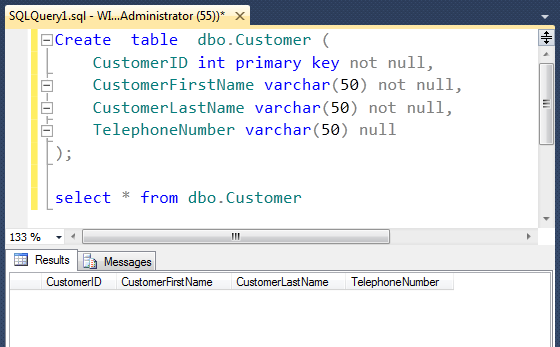
    When starting a project, we add fields in the database as per the technical specification supplied. For example, we might start with a customer table with a few fields.

    It is not long before more requirements surface.

    Companies change and so does requirements.

    In some cases, such as compliance or contracts, the information required can change depending on the machine, audit or new information that is required.

    For these use cases, it doesn’t make sense to have all of these fields in a traditional relational (or noSQL) database.

    In some industries, changes need to happen quickly and dynamically. For example, someone doing audits of kitchen devices in the hospitality industry needs to have the power to change required fields for different sites, appliances and roles.

    In this post, I want to explore the options for ever-changing forms and contracts – what tools and patterns are available to us to help us manage this better?

    Contract Templates

    Contracts come in all shapes and sizes. These include rental, legal and employment to name a few.

    Many of these can be semi-standard. For example, rental contracts might have a few permutations – sectional title, full title and daily/weekly rentals. One could create a text replace function where certain characters need to be extracted, such as double curly brackets – {{CustomerName}}. These fields can then be entered and the contract created.

    Form Builders

    It is every developer’s dream to write a meta-system that writes code – many having the dream to build a system that caters for 80% of permutations of customer needs. Though form builders can assist with this, I have found that this is a goal marker that keeps on moving.

    I do however believe that in many cases, a form builder makes a lot of sense.

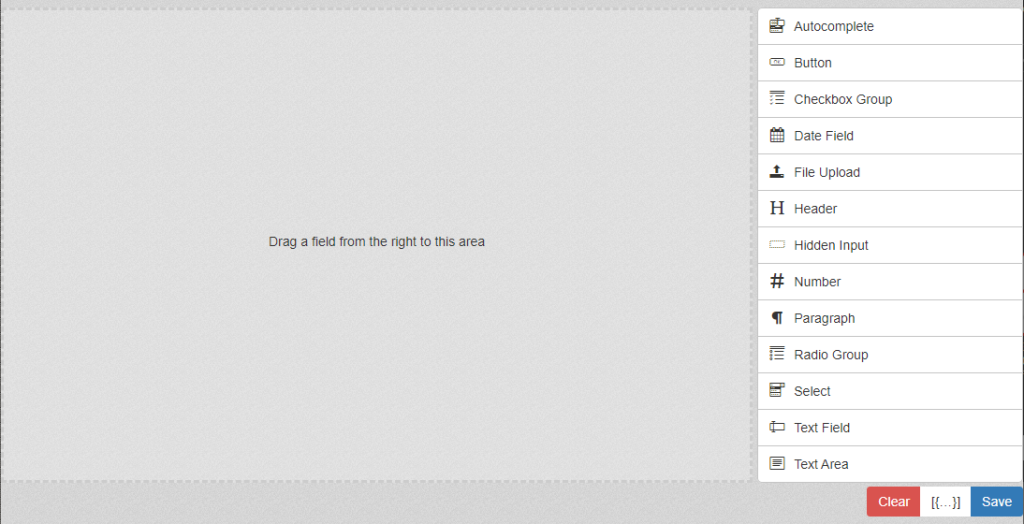
    I recently came across formbuilder.online. It allows for a simple drag and drop interface that saves data back into JSON. It is easily initialised by the following code (if you have the CDN script installed):

    jQuery($ => {
    const fbTemplate = document.getElementById('build-wrap');
    $(fbTemplate).formBuilder();
    });

    Exporting the form in HTML is easy. As the building and rendering generally happens in two different locations in the software, it uses two different libraries:

    the formBuilder and the formRender:

    const html = $('#render-container').formRender('html'); // HTML string

    And saving the output into JSON:
    const fbEditor = document.getElementById("build-wrap");
    const formBuilder = $(fbEditor).formBuilder();
    document.getElementById("saveData").addEventListener("click", () => {

    console.log("external save clicked");
    const result = formBuilder.actions.save();
    console.log("result:", result);

    });

    Managing form data

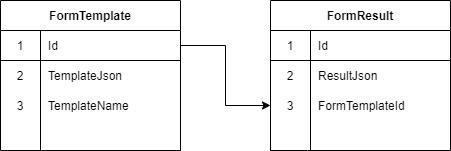
    In some cases, it would make sense to save the form data in lookup tables – especially if reporting will be a requirement. Generally, for most applications though, the full JSON result can be saved in a single field and be recalled as a whole when needed.

    A pattern I have seen that tends to work well is using a template type where the original template is saved and the result copies the template as a form that can be filled in.

    Contract related requirements

    To end off the requirements, I want to add a special section on other elements I’ve seen that are required for contracts:

    • Editable terms and conditions – these change from time to time and it is recommended to handle this in the same template mechanism
    • Signatures – there are multiple JavaScript libraries handling signatures. I quite like Signature pad, as it is easily implemented
      • Creation:
        var canvas = document.querySelector("canvas");
        var signaturePad = new SignaturePad(canvas);
      • Saving result:
        signaturePad.toDataURL("image/jpeg"); // save image as JPEG
    • History and data tracking –
      • Having a history table that tracks the logged-in user’s changes to contracts would be prudent.
      • Most code solution gives you the ability to track the IP of the device. In C# .NET Core, it can be done with the following code:
        var remoteIpAddress = Request.HttpContext.Connection.RemoteIpAddress;
        return remoteIpAddress.MapToIPv6().ToString();
    • PDF Creation – It would often be required for users to export signed contracts to PDF. There are many HTML to PDF converters, including the well-known iText. Always check the licensing terms to make sure you are not breaking the law.

    Conclusion

    Managing forms and contracts that change can be challenging. With current technology, there are solutions to make our lives a bit easier such as form builders and writing a simple find and replace function.

    Make sure you meet all the legal requirements of the contract or audit!

    Enjoy your business

  • When should I rewrite an existing system?

    When should I rewrite an existing system?

    Before you rewrite an existing system

    To rewrite an existing system takes time, money and effort. The decision should not be taken lightly. A large number of resources (money, man-hours, management) will be poured into the new solution. A fair amount of analysis will also need to be done upfront, with estimates of new hardware requirements, technology costs and the training learning curve that will eat into your developer’s time.

    When considering a rewrite, you need to think about your existing codebase  (quality, versions and architecture), the software you use (e.g. hosting operating system, database management too) and the obvious time/money/quality equilibrium.

    What is legacy code/software?

    Defining legacy code/software can be challenging. Here are some of my favourite definitions:

    • The code I checked into source control this morning
    • Software that is no longer supported by the company that published it (e.g. Windows XP)
    • Software or code that has a very limited number of developers in the world that specialise in it and is older than 5 years.

    It really boils down to this: is your legacy software holding you back from scaling your business? do you want to grow your business, but don’t have the ability due to constraints?

    The maintenance/green fields dilemma

    Most developers want to work on new systems. They want new technologies, new challenges and to create something fresh and challenging. Whoever the person is that will need to maintain the solution – well, that is irrelevant. In my experience, I see and hear many developers who leave a company as soon as they are forced into a support role.

    Having said that it is challenging for a business to start a project from scratch again. The reason as all the business rules are hardly ever documented. Spending a year in an attempt to get business analysts to assess the solution is also not necessarily viable – especially for small and medium-sized businesses.

    As with all things, in business there is a trade-off between quality, time and money. It is often believed that staying with the status quo will be more cost-effective.

    The real cost of legacy systems

    When I was still working as a fulltime developer, I sat in a meeting where I explained to my (then) boss that the code was a mess and it was just impossible to manage. We also didn’t have unit tests, continuous integration or any means to note if something broke. His response was simple: “Well, it is working”.

    I find that software developers cannot always tell the business what is really happening under the hood in the code. Here are some factors to consider and discuss before doing a rewrite – and some to discuss with your tech partner:

    • Developer turnover – what is the cost of training new developers on a legacy system? What if your current developers leave?
    • Legal implications – what would happen if changes need to be applied or the system fails due to spaghetti code?
      • For example, if your code base generates legal documents in different locations. A legal change has to be implemented, but your developers cannot guarantee that all the changes will be implemented in all the locations.
    • Financial impact – With the amount of support, inflexibility and constraints, is the legacy software stopping you from expanding your business?

    Legacy code has a much bigger impact on a business than we would like to believe.

    Complexity and the rewrite

    Many business systems are very complex – some with good reason (such as complex financial systems). Other systems tend to be boiler-plated and made more complicated to future proof the system (e.g. dynamic configurability).

    When rewriting a system, it makes sense that one would want to have the code as open and as extendible as possible – yet one needs to consider the maintenance, learning curve of new developers and the resources that are wasted by not getting to market quickly enough.

    I don’t want to rewrite my existing system

    Any system will at one time or another become legacy. Your system will need an upgrade at some time in the life of the business. It is also fair that there might not be an opportunity today for the rewrite.

    Let us take the following scenario. An MVC (C# .NET) solution was written about 10 years ago. The version of MVC is outdated, it is running on SQL 2000 and contains more than 10 years of business logic and fine-tuning. As a stable system, it makes sense that you don’t want to tinker too much with it.

    There are however certain elements that one can change to upgrade the solution incrementally:

    • Set a day every week that will be spent on upgrades.
    • Consider upgrading the testing servers/database first. The testers will be able to find issues fast here
    • Upgrade the packages and linked libraries to the latest versions.
    • Have a rule that unit/integration tests be added whenever a bug is fixed.
    • Consider extracting the code logic – This could be done in a separate project,  into DLL libraries or an external solution in some cases. This will make it easier to rebuild the solution when the time comes.

    Keeping software clean and well maintained can assist when the time for a rewrite comes. It also gives the team a sense of pride and accomplishment.

    I need a rewrite

    When the risk becomes too big, it makes sense to rewrite a legacy system. In this case, it would be prudent to:

    • Find a minimum viable product that would cover at least a small business case. Start with this small dial lifting change and then grow your business. Get something out to the client or business as soon as possible.
    • After the MVP, focus on the next small feature that will have the biggest impact on the business
    • Make sure that the software is well documented – this might not be important right now, but will be exceptionally important later on.
    • If the old and new systems can be run in parallel, then do so until the new system fulfils all the requirements.

    Conclusion

    Not all legacy code needs to be rewritten – and not all systems should be upgraded to the latest versions. We need to understand that there is a risk to keep old code and software as-is in our businesses.

    Make sure that the risk will not drive away developers or leave the business cripple once the system falls over due to a vulnerability, exploitation or hack.

    When deciding on rewriting your legacy system, start with something small – focus on dial lifting changes that will make a big difference in the company. These should be small chunks/sprints, so that direction can be changed quickly without costing too much.

    Keep your pulse on the technology, cost and maintenance.

    Enjoy your business.

  • Lessons learnt from managing developers

    Lessons learnt from managing developers

    Software developers and management

    Being a software developer myself, it is always interesting what I discover managing other developers. It gives you perspective into behaviours which you have seen in yourself, your team, product owners and businesses.

    Software developers are seen as the mushrooms of a company – they get fed pizza and coffee in a dark room, and turn this into software. It’s also unknown what happens in this room, yet we see features, functions, new solutions and problems getting solved.

    Larger organizations tend to have a development or project manager who liaises between business and IT. This stakeholder management is sometimes insufficient, as the round trip of getting the needed information could take longer than the business owner would like.

    The product owner’s relationship with the developers

    In some cases, it becomes more convenient that the product owner contacts the developer directly. Yet, the impact is seldomly understood.

    In some cases, such as a specific incident it makes perfect sense, for the product owner to contact the developer directly, yet not everything is such an incident. For example, if one person cannot log in, it is not an incident, but if the whole company is coming to a standstill due to a system being down, it changes the scenario.

    When developers tackle complex problems, focus time is needed to get code done. It has been explained by some as ‘the zone’ or ‘the zen of programming’. In case of interruption (though only 2 minutes), this zone is destroyed.

    It can take up to 45 minutes to get back into the zone.

    I personally found it better to have a set time to get feedback from developers. all questions can be asked, but feedback should be expected at the set time.

    Time management

    We know that business owners want deadlines on delivery, but few developers are able to give exact timelines, especially with constant interruptions.

    For this reason, many developer teams take the agile approach. Points are assigned to a ticket, and then a certain number of points are agreed upon for a sprint of 2 weeks.

    It happens at times that the developers work strange hours. When they are in the zone, they could work through the night and have an amazing finished feature the next morning.

    Developers can easily also lose track of time and deliver something that was never asked for. For example, adding filters on tables and making obsolete fields configurable.

    Agility

    Developers like to code according to spec. In some cases, they can give estimates, but cannot see certain issues such as API integration issues and incidents that push the deadline forward.

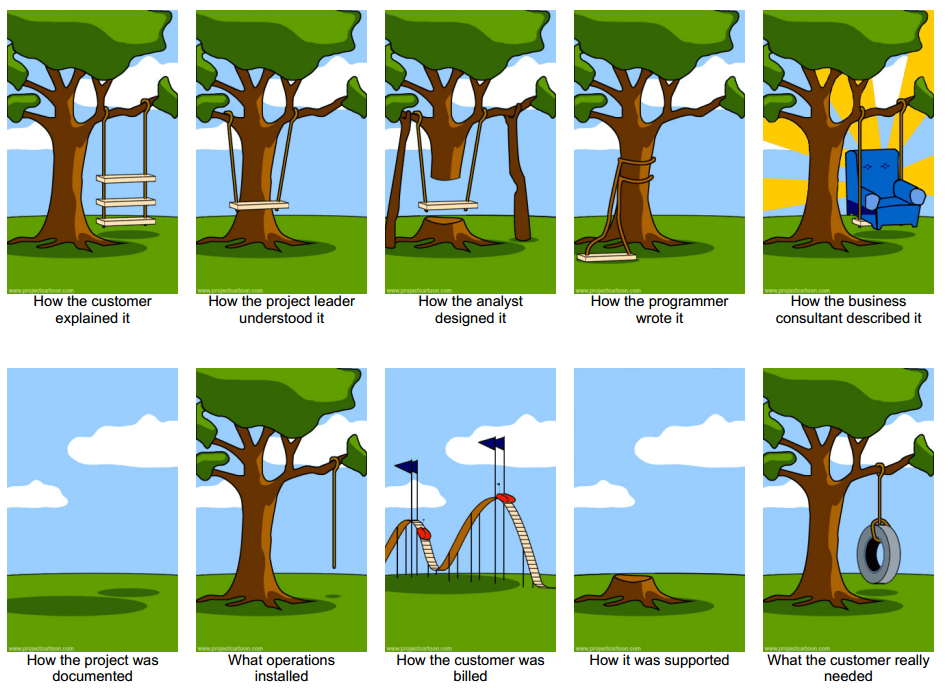
    In my experience, it often happens that the spec and what the client requires are not the same. When the client is presented with the code according to spec, the requirements are changed so that it fits the requirements of the client better. In some cases, the underlying data structures need to change, and in others, UI design patterns have to be broken to accommodate the new changes.

    This tends to cause developers to make rude hand gestures and resign a job.

    To manage this is a delicate situation. It’s best to try to understand the reason for the developer pushing back. In some cases, there is a valid reason, whereas in others the product cannot function as intended without the new change to the original spec.

    Finding bugs

    When a bug is found, the terminology of communicating the issue is exceptionally important for a developer. One should never say things like ‘the issue is still there’ or ‘this is broken’ or type EVERYTHING in all caps. A better approach is to show the developer the problem and ask them if this is a bug – or if this is the intended behaviour. In some cases, it is how the system should function, and the product owner forgot about the business rule.

    On the other hand, I cannot deny that developers are sometimes overly sensitive and have an emotional connection with their code. To tackle this is challenging at the best of times, as this indicates dedication and personal involvement in the success of the product.

    It’s highly recommended to have a bug and issue sheet that is supplied to the developers at a given time, and not in pieces throughout the day.

    Crisis management

    Incidents happen.

    Some are bigger incidents than others.

    When speaking to a developer about an incident, they will be able to tell you how serious it is. Though we would like to believe that what we see is the end of the world, it might be a single case.

    Developers require a lot of information to tackle a problem. In many cases, the business owner has no idea what these things are. This could include a video, phone numbers, user Ids, time that it happened, screenshots and so forth.

    If the business owner has no idea what needs to be supplied, ask the dev – but try and get as much information as possible. I find that it’s sometimes challenging for business owners to find the details required. For example, if an end-user of a mobile app is having issues, it’s difficult to call them multiple times and ask for screenshots, phone model information, app version and which brand of toothpaste they are using.

    Conclusion

    Working with developers can be a sensitive issue.

    Managing clients can be challenging, especially when they require certain details immediately.

    Finding the middle way is challenging, but is the only way to move a project forward with speed.

    Simply be effective.

  • Getting your software solution to market faster

    Getting your software solution to market faster

    When you have no time to spare

    Startups and small businesses often don’t have the budget, resources and expertise of large corporate businesses. This limitation can become the greatest strength by applying lean software development principles – eliminating waste and delivering only what the customer needs.

    Even though many developers love giving customers more than what they need in an attempt to under-promise and overdeliver. When developing for getting a product to market, all unnecessary elements need to be removed from the equation.

    This might include theming, customising, features, data filters, and other elements that might not be critically important for the customer right now.

    Needs analysis and focus

    A developer that works at a startup often needs to work long hours and deliver more than just code. To optimise the time spent as well as the effectiveness of the output, the developer need understands the customer needs to fulfil them appropriately.

    Needs can be analysed and discovered in many ways: Hotjar, Google Analytics and other tools offer us an insight into how customers interact with our solution.

    Startups and small businesses often have a low level of certainty concerning their customers’ needs. It would therefore make sense to take a leap of faith assumption and start testing their needs (and the assumptions that we make).

    Lean software development

    Lean software development is all about cutting waste and testing our assumptions about our clients, our product and the industry. The following is an outline of the process:

    1. Eliminate waste – determine what is actually important. Cut out unnecessary features or enhancements that are not critical.
    2. Amplify learning – Don’t spend days doing documentation and planning sessions that don’t deliver results. Have short iterations with regular customer feedback cycles included?
    3. Decide as late as possible – when dealing with uncertainty, it might benefit the client to create bite-sized solutions first – and therefore deferring larger decisions of the end product until more is learned of what is actually required.
    4. Deliver as fast as possible – time to market is crucial in getting user feedback. It, therefore, makes sense that any tools, plugins and other means must be used to move the project forward.
    5. Empower the team – allow software developers to make decisions about what their validated learning has proved to be correct.
    6. Build in integrity – The customer needs to be at the heart of what is done. The product must solve a specific problem. If the problem is solved successfully, it will build trust in the company and product. This, in turn, will build integrity so that the marketing, software and image all contribute to the same solution.
    7. Optimise the whole – Issues in software can damage the integrity of the software and brand. It is therefore vital that integrations with third parties, bugs and issues are prioritised on the urgent-important scale, where the most important and most urgent issues get the first attention.

    Think big, act small, fail fast; learn rapidly

    – Mary Poppendieck

    The minimum viable product (MVP)

    Many clients have the viewpoint that the only way to go to market is with a fully built product. This, however, can easily ruin a small company or startup financially.

    To the first paying client, one can create a minimum viable product to test their hypothesis and problem statement.

    For an MVP, the developer can use any means within reason to speed up output. The MVP could be something as small as a WordPress site with WooCommerce.

    One could easily test the use cases with WordPress – developing plugins and reporting for many cases. Once viability is determined and the system outgrows the MVP/prototype, a custom bespoke solution can be developed for more complex systems.

    Note that in some larger corporate solutions, the MVP might be a six-month project for a team. The focus should be on determining and developing what is actually important.

    For example, if a large life insurer would like to bring to market a tool to help financial advisors predict retirement income, a simple spreadsheet might be the first stop to see the reactions and needs of the financial advisors. When the solution is ready for coding, one could easily set up a simple front end with chart components and code back end that opens, writes, reads and calculates the values from an excel file before it’s translated into code.

    Tools to speed up delivery

    There is a plethora of software plugins, DLLs, open source projects and code snippets available that can assist in speeding up delivery.

    It’s worth doing a quick check for open source solutions available that could be used as a base for the MVP.

    Here are some ideas to get a project off the ground:

    • Base software – WordPress, DNN, open source CRMs and built in framework functionality (e.g. .NET Identity for authentication) can speed up a project to get it off the ground faster.
    • Front end plugins, libraries and frameworks – Jquery, Angular, Bootstrap, datatables.net and Telerik could also assist in meeting requirements for lean testing.
    • Dev-ops – Continuous integration tools (TeamCity, Jenkins), Continuous deployment (Octopus) and logging services (ElasitcSearch or appcenter.ms for mobile apps)
    • Cloud solutions such as Azure and AWS offers many services, functionality and APIs to speed up development

    Conclusion

    For many startups, the focus is on getting to market as soon as possible. They do not always have the time to wait six months for bespoke development.

    Rapid application development tools can assist developers in getting a customer’s product to market as soon as possible.

    Though one needs to weigh up the impact this might have in the long run, once the company’s cash flow is there, more enhancements can be added to the list.

    Simply be effective.

    Sources consulted

  • Writing code and doing dev-ops for stability

    Writing code and doing dev-ops for stability

    When stability is everything

    When you write code, make it future-proof.

    In many industries, the stability and consistency of a system are critical to business success. Yet, we require changes to be made without affecting stability.

    As a software developer, one is able to make strategic choices to optimise a solution for stability. Versioning and rollback strategies, unit tests and simplifying code can all assist with confidence in the solidity of the solution.

    Unit tests and automation tests

    Unit tests essentially test certain scenarios to confirm that the code will react in the desired way. If the unit test breaks, it means that the changes should be relooked, or the unit test changed to fit the new business rule.

    When a developer adds unit and integration tests, it will empower him to know when changing something in a solution will break the existing business rules.

    If the resources allow, an automation tester can add tests on the user interfaces. This is a fail-safe for unit tests, as often unit tests do not cover user interactions.

    If unit tests are combined with automation tests, this will empower software developers and business owners to become more confident that deploying code will have the desired outcome.

    Deployments and dev-ops

    A $460 million dev-ops disaster

    Knightsbridge, a forex trading company didn’t have a proper deployment strategy in place. One evening, they deployed code to their servers. Having multiple servers to deploy to, they forgot to switch a flag off on one of the servers. Here’s a quote from the US Securities and Exchange Commission filing:

    “During the deployment of the new code, however, one of Knight’s technicians did not copy the new code to one of the eight SMARS computer servers. Knight did not have a second technician review this deployment and no one at Knight realized that the Power Peg code had not been removed from the eighth server, nor the new RLP code added. Knight had no written procedures that required such a review.
    SEC Filing | Release No. 70694 | October 16, 2013

    Knight Capital Group realized a $460 million loss in 45-minutes.

    Devops

    It makes sense that the deployment process needs to be automated. For this reason, software such as Octopus deploy and continuous integration (CI) solutions such as TeamCity, Go Pipelines and Jenkins , that do automatic builds, run unit tests, etc.

    It is also advisable to have one-click deploys, implemented with a blue-green strategy, where the solution will only deploy if all steps were completed successfully.

    Versioning and deployment

    Many managers who have to deal with unstable code believe that not upgrading or deploying new code is the answer to keeping the status quo. This is, however, not possible in the fast-paced digital businesses of today.

    It is therefore advisable when deploying new changes to a codebase that is unstable, large and/or complex, one needs to know exactly what will be going live. For this reason, it’s important to have a proper deployment process in place, including source control logs of all changes.

    Having all this information available will not only give a  developer the ability to find bugs faster (as he knows the changes that happened) but also give the product owner peace of mind about what is currently in the production system.

    Simplicity

    If you write less code, then there is less code that can break

    Making the codebase smaller by deleting code that is unused, deprecated and/or duplicated can lower the risk of issues sneaking in. For example, the IDE’s IntelliSense might tell you that certain methods are available, while they are not in use.

    When writing code, it is advisable that best practices need to be followed with regards to naming conventions and code structures. It would not only be easier to debug, but any changes to the code can be made with clarity, rather than guesswork.

    Developers are able to simplify code by constructively refactoring like refactoring large methods into classes with smaller methods.

    Should I upgrade/update often?

    I once worked on a solution that was running a version of SQLServer that was 20 years old. We were explicitly told that the solution was a critical business system.

    Not only was this run on a PC where the operating system had no more support updates, but it was also itself not upgraded.

    Concerning upgrading a system, the options and impact are as follows:

    • Never upgrade
      • this will cause certain devices and browsers not to display the app properly
      • The risk of hacking and errors on the software, operating system and infrastructure is greatly increased.
      • The code might be stable for the time being but will require a total rewrite when the existing system cannot work as expected anymore
    • Upgrade major versions
      • Code without unit test coverage might be unstable with the next release.
      • The code lifetime is lengthened
      • More work will be required to make the major upgrades due to deprecated functions
    • Upgrade on a regular interval (6 monthly or annually)
      • Code without unit test coverage might be unstable with the next release, but the impact will be smaller than upgrades with major releases.
      • The code lifetime is lengthened
      • The changes are broken down into smaller, bitesize chunks

    Conclusion

    Software stability in some scenarios are vital to some business. For these businesses, it makes sense that they have the proper infrastructure in place to cut out any human error.

    Using proper unit, integration and automation tests could prevent complex business rules turning into a crisis.

    Though one might consider never upgrading a system, it needs to be understood that this might be delaying the inevitable – rewriting and/or refactoring code.

    When stability is important, make sure proper due diligence is done and processes are in place to stop rogue code being promoted to production.

    Simply be effective.

    Sources consulted

  • Writing code for maintainability

    Writing code for maintainability

    Someone will need to maintain your code

    Most of the effort in the software business goes into the maintenance of code that already exists

    Wietse Venema

    Most developers are generally not satisfied with being stuck in a job where they need to handle only support. The idea of a fresh new solution that needs to be created and formed is exceptionally tempting – and many developers will leave a job to get away from the support.

    To prevent a high staff turnover, it’s vital that developers need to write sustainable, maintainable and understandable code.

    Write code as if the person that will maintain your code is a murdering psychopath.

    Many contractors and businesses are focused on delivery – if the application is not in production and working, then it’s not finished. For this reason unit tests, naming conventions and clean code is often sacrificed for early delivery.

    Maintainable code and code smells

    Uncle Bob famously compared writing code to a chef preparing a meal. He would sometimes need to multitask and check that everything will be ready in time, the food will be hot and that the presentation is perfect – and most of all, clean up as they go along. When they present the final dish at the end, the kitchen behind them is clean. In the same way, developers need to clean as they go.

    When maintaining code, developers always need to leave code in better condition.

    When bug tracking, it often happens that you look at a piece of code and think “What in heaven’s name…?”. This is what we call a code smell – and often technical debt. It is in the interest of the developer to clean up as he goes along – and a code smell should be the starting point to do a little refactoring or cleaning.

    A code smell is a surface indication that usually corresponds to a deeper problem in the system.

    Martin Fowler

    Code will only be maintainable if we constantly take a little time to make it cleaner when we touch it. Note that the aim is not over-engineering, but sometimes even renaming a method or property will allow the code to be more readable.

    Patterns & practices

    When optimising for maintainability, developers need to focus on following good practices and design patterns.

    These include a standard for naming conventions of methods and properties. Here are some pointers:

    • Follow SOLID principles – more info here
    • Do not abbreviate methods or property names
    • Don’t repeat yourself – don’t write the same code more than once.
    • Simplify the code base – code that’s not there cannot break
    • Be clear in your naming conventions – for example, Validate() is not a clear method. What is it validating? How can we rename this to be clearer?

    Separation of concerns

    Oftentimes a piece of code starts expanding past what it was originally designed for. This is normal, but it’s recommended that once this is noticed, refactoring needs to take place. Here are some thoughts on the separation of concerns and refactoring:

    • Keep your methods small – only a couple of lines if possible. This will make it clear what the methods are doing. When you find that a method becomes too large, it is often a sign that it breaks the single responsibility principle. Extract these into smaller methods
    • Avoid reuse of tables in a database with different elements that are not of the same type – for example, when you have a table with containers, don’t reuse the table for moulds, inventory and car parts. Even though it might look like the fields reuse would be a good idea, it can become unmaintainable in the long run.
    • When building user interfaces, keep different concepts in different places. For example, don’t add cars, houses, chickens and users in the same list and allow for editing these. From a usability level, users need to get used to where to find users, livestock or assets.

    Dependency Injection

    Though there are many opinions about dependency injection, it’s worth noting that interfaces with implementation assists in decoupling software and allowing developers to swap out the implementation of classes, without any massive code changes.

    As dependency injection is linked to inversion of control (SOLID principles), it’s a good practice to do in a project, especially if unit tests would be required.

    Unit tests

    When a change request is actioned, everyone needs to know that the changes will not affect other parts of the system. This is especially important where a client has a complex calculations engine such as insurance policy premium calculations – this should not fail, as this could mean the difference between profitability and legal action.

    With a plethora of unit test solutions that can seamlessly integrate into any codebase, it’s becoming easier to write tests to make sure that processes and business rules will be followed, and throw an exception if any error occurs.

    Integrating unit tests into continuous integration can also help developers to pick up issues long before it reaches production.

    Conclusion

    Solutions grow over time. More functionality is often required and needs to be added.

    Having well structured, clean code with unit test coverage can assist in picking up issues long before they could happen.

    Maintaining code requires consistency, and therefore it’s a prerequisite to have best practices in place. The expectations and standards need to be clearly defined so that all parties are aware of what is expected.

    Simply be effective.

    Sources consulted

  • Writing code so that your software can be dynamically configured

    Writing code so that your software can be dynamically configured

    Choosing to optimise for dynamic configuration

    In the last few years, dynamic configuration has become more important in software development architectural decisions. The reason for this is the need for business and product owners to be able to change the behaviour of a system without delay or deployment.

    In many scenarios, it is not economically viable or actionable to stop a live system to make changes. With deployment cycles sometimes lasting months, the need for important and urgent changes needed can be a huge headache in a company.

    It is for this reason that the architectural decision is taken to make functionality dynamically configurable.

    Complex problems needing configuration

    Understanding dynamic configurable systems is best explained at the hand of examples.

    I have previously worked on a rules engine where all rules were saved in a SQL Database as strings. C# would evaluate all the rules and return the result.

    Another example is companies requiring dynamic forms, depending on a large list of variables. This happens quite often in the insurance and financial services industry – the business rules are complex.

    In both these scenarios, the data can change quickly – and the system needs to allow for this.

    Software configuration examples

    With the extreme cases above, let us look at other examples where dynamic configuration can help software be more flexible:

    • Software developers can add code to toggle functionality on or off
    • Security, roles and permissions can be handled by a user interface. This will cut the developer out of the process
    • Dynamic forms that will allow the system to display what is necessary with a large set of variables can be added.

    Why would configuration be a bad idea?

    Writing highly configurable code can allow for fluid and dynamic systems yet is not necessarily fit for every product:

    • The overhead and time spent on the initial solution can cause delays in getting the product to market
    • Unless the coding stories are broken down and monitored, it can allow for scope creep and over-engineering.
    • The benefit does not outweigh the effort
    • Depending on the implementation, there could be a performance impact that would be challenging to debug.
    • Configuration can in some circumstances make code more complex and provide job security to your developers
    • For complex systems such as rules engines, the business logic is moved into the database. This will lower the unit test coverage, as changes can be made to the rules on the fly.

    Planning for configuration

    It is generally easier to update database entries, compared to the process of fixing code and deploying the solution.  This is why dynamic configuration is often moved into the database.

    The Database can be updated in a variety of ways:

    • File drops – updating settings and the database through uploading files
    • HTTP endpoints – these endpoints can be called by another system or by developers to change the behaviour of the system.
    •  Remote app configuration – allow certain settings to read from a remote source such as Azure App Configuration
    • Creating SQL lookups and/or configurable fields that can be updated directly

    It is often the case that a large amount of code infrastructure will be required to make items configurable. It, therefore, makes sense to choose wisely which settings, rules and/or fields need to be changed on the fly.

    • Shortlist and prioritise the settings that will be changed often
    • Plan a mechanism so that it can be reused for other settings
    • Estimate the work involved to make the code configurable and allow code reuse of the configuration mechanism
    • Implement a solution that will allow for dynamic configuration

    Conclusion

    When it comes to coding, we love over-engineering. We also love making systems dynamically configurable.

    This allows systems to stay online while we change settings and rules.

    It makes sense if the trade-off with the time of implementation is justified.

    Sources consulted

  • The Effectify Way – Planning your software development project

    The Effectify Way – Planning your software development project

    Effectivity through good processes

    Every day many employees and businesses use complexity as a way to hide issues and unprofitability. .

    One should never be dazzled by complexity.

    The Effectify way is, as the name suggests taken from the Toyota way. It’s about optimising the process and simplifying what we have to have better performance and make something more usable.

    Our approach

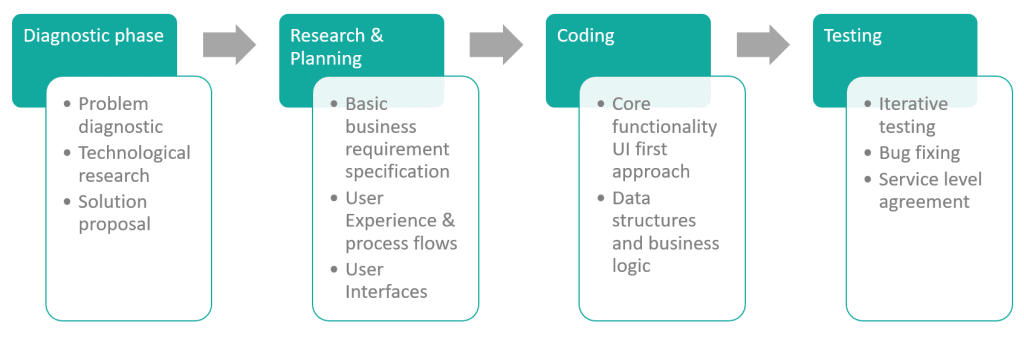
    The SDLC and problem solving

    Though the software development life cycle is cyclical, it very often happens that the clients prefer to hand over the maintenance of the solution to their own team or hire their own software developer to maintain it.

    For this reason, the process below is linear.

    The Effectify Way focuses on solving customer issues.

    Once a problem is defined, it’s only a matter of time until it is resolved.

    As it’s important to find, define and solve the problems long before the coding starts, the focus is placed on research and understanding the problems involved.

    What if the uncertainty is too great?

    In certain scenarios, a problem cannot be defined as easily as the above. For example, a startup functions under extreme uncertainty.

    Though many problems can be solved, one needs to solve only relevant problems. This needs to happen in bite-sized chunks.

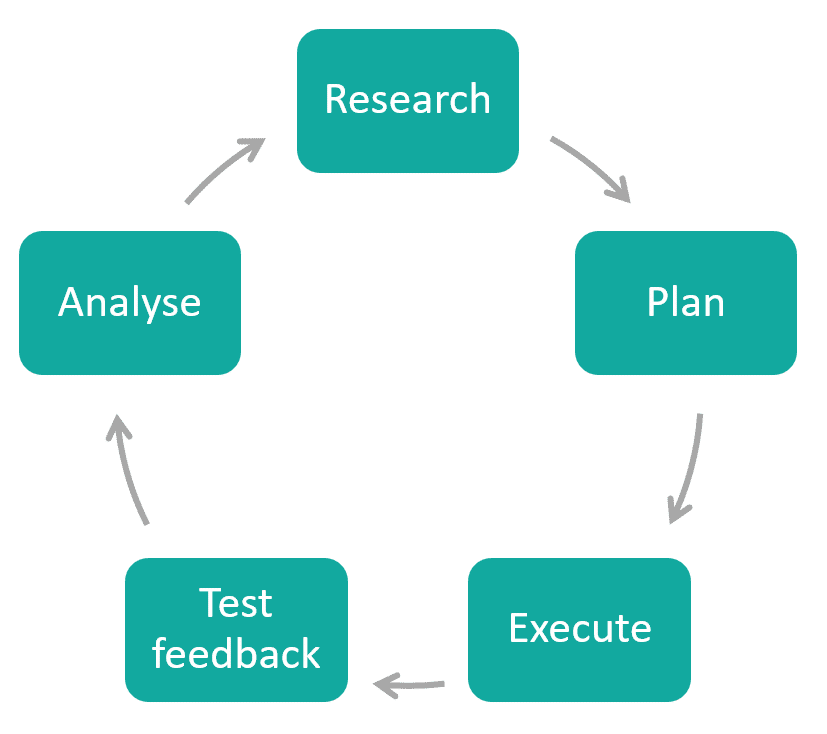
    As the answer to the current problem could determine the next question/problem to solve, it makes sense that a linear approach would be unproductive. A cyclical approach would be appropriate for businesses that have a high level of uncertainty.

    Each iteration identifies the next question that needs to be asked. Once the question is identified, one can execute a test to receive the next answer.

    Should my project be linear or cyclical?

    Depending on the client needs, either one of the two approaches can be used.

    To avoid the deadly spiral of over-engineering, it is wise to use certainty as the gauge for the decision.

    Once the diagnostic phase has been completed, the appropriate approach would surface.

    The diagnostic phase

    Before any coding or work starts, we prefer doing a diagnostic phase.

    It’s important that we understand the problem that we need to solve.

    For example, a client is looking for API integration with all the major phone networks. He hasn’t inquired yet about existing APIs and current functionality. If this is part of the core functionality, this dependency could determine the success of the project. It would be irresponsible to give time and monetary estimates unless this has been unpacked.

    It’s definitely not ideal to start a project and halfway into the project it is discovered that the timeline moves out with 6 months, or that the vital integrations do not exist.

    Research and planning

    Once the diagnostic phase has been completed, one is able to give timelines and cost estimates for the work that needs to get done.

    Once the research and planning phase has been completed, a research document – a business requirement specification (BRS) will be delivered to the client. This is very similar to a business requirement specification, and developers can use this as a base for the coding that needs to be done.

    In the diagnostic phase, the technical aspects such as API integration, third party requirements and the appropriate platform has been fleshed out. In the research and planning phase, the appropriate system and code architecture needs to be considered.

    The research and planning toolbox

    Technical and code approaches
    • Appropriate technology choices
    • Architecture choices
    User Experience
    • Personas
    • Needs analysis
    • Process flows
    • User stories
    User Interfaces
    • Corporate identity and branding
    • Low fidelity mock-ups
    • High fidelity mock-ups
    • Icons

    In the research and planning phase, the user experience research and user interfaces are also included.

    To understand the user better, the Effectify way does a needs analysis (which could take the form of interviews, data tracking and collection of relevant information). From the information gathered, personas are created, followed by process flows and user stories.

    Execution – coding the solution

    Once the blueprint is in place, the execution can start. The blueprint will dictate the following:

    • the technology used – including coding framework, language and architecture
    • the platform (mobile, web, desktop application, cloud, etc)
    • third party integrations and external technologies leveraged

    We believe in a UI first approach to get more client feedback earlier in the software development lifecycle. If one can see how a solution will look and navigate, the code logic can be set up accordingly.

    It’s also important to supply weekly updates so that no one is out of the loop about where the project is and where it’s heading.

    Testing and feedback

    It’s worth noting that any company that claims that they write bug-free code needs to be avoided. As humans are involved, bugs are bound to creep in. For this reason, the Effectify Way avoids the ‘big reveal’ at all costs and does small incremental releases so that testing starts early in the process.

    Though unit test coverage for code is vital for code stability and trust, it’s also important to do negative and functional testing.

    Conclusion

    The Effectify Way is about simplifying processes.

    When someone uses software written by a developer, it needs to work.

    More importantly it needs to be used – it needs to be relevant, easy to use and viable.

    Simply put, it needs to be effective.