Category: Technology and Software Development

  • Scheduling location tracking tasks in the background with Xamarin Forms on Android

    Scheduling location tracking tasks in the background with Xamarin Forms on Android

    Android and background tasks

    Android has started to change how background tasks are run. For security and battery life, many new android phones are changing the length of background tasks to terminate within a few seconds of running – killing the desired result. The intention is that apps don’t run things that the user is not aware of in the background. 

    Imagine apps mining bitcoin in the background!

    Possible solutions and options

    As mobile technology is not nearly as mature as the web, it can be complicated – even for simple tasks. One would think that if you want to do a task without the user knowing, that you would need a background task – which is not necessarily the case. The operating system (OS) can kill a background service silently if it deems it unnecessary, processing heavy or doesn’t like it. For recurring tasks, this makes the background service a no go.

    A foreground service did seem like the next best option. This is a service that runs in the foreground – i.e. there is an icon and a sticky notification that displays. The issue is that pure “handle in the background” tasks are now active and visible.

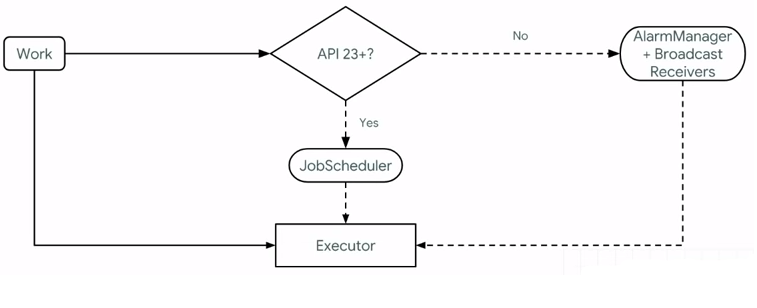
    With previous versions of Android, the AlarmManager and Broadcast Receivers work on older devices, whereas API 23+ implemented something called the JobScheduler. This allows us to schedule jobs to be executed. Though you can schedule periodic jobs through the WorkManager, the OS can kill it.

    So, using the WorkManager, we can get around this. The WorkManager allows us to create a worker that can run to do a task. Before this completes, we are able to reschedule another event that will allow the worker to execute. 

    The WorkManager

    The Android WorkManager is a library that manages tasks, even if the app exits or the device restarts. It manages this by wrapping the JobScheduler, AlarmManager and BroadcastReceivers all in one. Jon Douglas explains it like this on his Microsoft dev blog:
    Permissions

    The following permissions are needed to track location:

    • ACCESS_FINE_LOCATION – this is for getting the location
    • ACCESS_COARSE_LOCATION – this is for getting the location
    • ACCESS_BACKGROUND_LOCATION – if you need to access the location in the background, you need this permission for Android 11 (API level 30) or higher.
    • FOREGROUND_SERVICE – this will allow the app to run the service. 

    Technical requirements

    For this post, we need to have an Android foreground service and use the WorkManager to handle the scheduling. You can use any of the following libraries:

    Architectural code overview

    Shared Library / PCL Project calls

    We need several things to make this work. The first would be to get something to start the job schedule from the shared library/PCL project:

     public interface ILocationWorkerService
    {
    void StartService();
    void StopService();
    }

    This will be called with dependency resolving as below. Please make sure to register the dependency in the main activity!

     DependencyService.Get<ILocationWorkerService>().StartService();

    Worker Service

    In the Android project, we need an implementation of the interface above, with some place to schedule the worker. I use the name LocationWorkerService, as this is not the worker yet. The Worker is called the LocationWorker.

    public class LocationWorkerService : ILocationWorkerService
    {
    private static Context context = global::Android.App.Application.Context;
    public void StartService()
    {
    OneTimeWorkRequest taxWorkRequest = OneTimeWorkRequest.Builder.From<LocationWorker>()
    .SetInitialDelay(TimeSpan.FromSeconds(30)).Build();
    WorkManager.Instance.Enqueue(taxWorkRequest);
    }

    public void StopService()
    {
    SmarTechMobile.Helpers.Settings.TrackingIsActive = false;
    }
    }

    The Worker

    For the worker, we implement the Worker Android-specific class. The code to do the location tracking has been removed here, as links will be supplied further down below.

    The code below should run the job repeatedly, every 30 seconds. You might want to add special conditions, such as in the YouShouldResechedule variable – and I recommend doing so, as waking up the device every 30 seconds can be taxing on battery life.

    public class LocationWorker : Worker
    {
    public LocationWorker(Context context, WorkerParameters workerParameters) : base(context, workerParameters)
    {

    }
    public override Result DoWork()
    {
    try
    {
    var YouShouldRescedule = true;
    if (YouShouldRescedule)
    {
    Reschedule();
    }
    }
    catch (Exception)
    {
    Reschedule();
    }

    return Result.InvokeSuccess();

    }

    private static void Reschedule()
    {
    if (SmarTechMobile.Helpers.Settings.TrackingIsActive)
    {
    OneTimeWorkRequest taxWorkRequest = OneTimeWorkRequest.Builder.From<LocationWorker>()
    .SetInitialDelay(TimeSpan.FromSeconds(30)).Build();
    WorkManager.Instance.Enqueue(taxWorkRequest);
    }
    }

    }

    Location Tracking

    There are quite a few libraries that allow for location tracking, and thus it wouldn’t make sense to discuss all of their implementations in detail. I do want to list them with links, so that you can explore them:

    The Geolocator plugin was merged into Xamarni Essentials a while back, but it still has some background features that Xamarin Essentials lack. Both are really good though! I use the one by James Montemagno. The location can be called by the following in the worker:

    var locator = CrossGeolocator.Current;
    var position = await locator.GetLastKnownLocationAsync();

    Please make sure that you have all the permissions sorted – anything that happens in the background will fail silently if no permissions were granted.

    Conclusion

    Location tracking can be complicated. Be careful though – it is recommended that you don’t use it because it’s a nifty feature – the Play store might decline your app if you don’t have a purpose for it. As stated on the documentation:

    Note:The Google Play store has updated its policy concerning device location, restricting background location access to apps that need it for their core functionality and meet related policy requirements. Adopting these best practices doesn’t guarantee Google Play approves your app’s usage of location in the background.

    The message is this: use functionality with care.

    Enjoy your business! 

    Sources consulted

  • Mobile or web application  – which one does my business need?

    Mobile or web application – which one does my business need?

    Mobile or web application – the big debate

    When starting out, founders often have a strong idea about what channel their new venture should use. The two most popular ones are mobile applications and web applications. We know that these technologies have been used for a few years, but it is worth it to explore what the technological limitations, human behaviour and product-channel fit will be for the startup.

    If you only have a hammer, every problem looks like a nail

    With well-established technology in both spheres, software developers are able to build cross-platform mobile and web applications. Yet, with the resource restrictions (financial, time and people) on startups, it becomes exceptionally important to minimise wastage – and researching the pros and cons of all channels before making the final decision.

    All things considered

    I want to make fair mention that you need to consider each platform, different infrastructure and marketing channels for the platforms. For example, you need to look at:

    • Infrastructure costs
    • Customer acquisition models
    • Market segmentation and technological compatibility
    • The financial impact on the startup or small business

    I am of the opinion that you should have empirical proof from your customers before you code a feature. The same is true for choosing a platform. Don’t just choose a platform on a feature or system without testing the outcome!

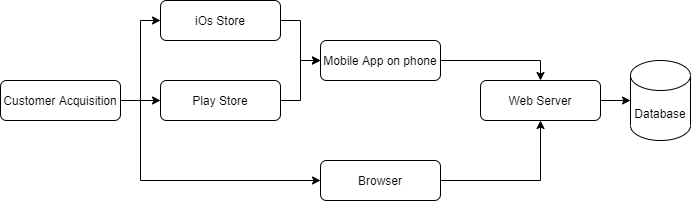
    Mobile or web application: A channel architectural overview

    The cross-platform technology for converting a single code set for use on the web, mobile phones and tablets is not as mature as for example the cross-browser support that JQuery and Bootstrap offer all web browsers. There are a few coding frameworks that offer a general one-size-fits-all solution but can create unforeseen technological stonewalls and issues. These may range from scrolling issues to unsupported features.

    Generally, the server allows shared business logic between a mobile app and a website. The browser and mobile app tend to be a lightweight ‘shell’ with very little business logic. This allows for server code reuse and decreases platform specific issues and bugs.

    Choosing a mobile app

    When deciding on a mobile application as your chosen channel, cost and business niche are the two biggest considerations.

    Certain business models need to have an app available on-the-go. For example, it makes sense for a pick-up and delivery solution, such as Uber, to be on a mobile phone – you need access to it wherever you are.  In another case, it would be convenient to have a mobile app, but not essential to the business model. Examples include an informational service (such as an article repository with only a few articles) and services that are used less often (such as motor vehicle registration).

    It is not unheard of that people delete an app if the internet connection is lost in the app, a UI alignment issue is not to their liking or the app experience is not exactly what they are looking for.

    Mobile app users are not forgiving.

    Considerations for mobile apps

    Mobile apps, though perceived as the holy grail, can sometimes sink a startup The following factors need to be considered:

    • Users on the store rate your app and leave reviews – customer service is vital in resolving issues. Even though cross platform technology allows catering to many phones and tablets, it is impossible to cater for everything.
    • There might be a substantial amount of red tape to cross before you launch your app. For example, legal paperwork and login details would need to be provided and certain approvals need to be handled.
    • You will set yourself at the mercy of the store. If they update their terms of service, your business model might be affected.

    A mobile app also has a financial impact on your business:

    • Mobile app development tends to be more expensive to code. It can also become very complex really fast.
    • All payments need to be handled by the store. The standard charge is around 30% of gross payment
    • Annual fees payable to the stores – some stores have a once off fee, whereas others have an annual subscription fee to host your mobile apps
    • Server costs and infrastructure – in many cases, only half of the business logic is on the mobile app. The other half is on a web server that the mobile app connects to.

    In my personal experience, the only features I have seen that make a mobile app different from a web application is push notifications. Though Android does allow for web push notifications,  iOS doesn’t allow for this at the moment.

    Choosing a web application

    Web applications are more mature in technology than mobile apps. With code libraries like bootstrap and jQuery and Angular coders can create cross-platform single page applications or progressive web apps for online and offline use.

    Though web apps are versatile and easy to deploy, the issue of trust can be difficult to overcome. There is nobody that can verify the legitimacy of a website.

    Websites are also easily forgotten and not bookmarked. Retargeting and customer communications are vital in turning them into returning customers. In some cases, it makes sense to use web push notifications, but might be seen as spam by some.

    Considerations for a mobile app

    Consider the following before choosing to build a web application:

    • Would you need to integrate a payment gateway? What will the cost be?
    • Do you need to send communications such as email and SMSs for awareness?
    • Which technology stack do you want to use? The .NET Framework, MEAN- or LAMP stack?
    • How much should be doable offline? Is this a fully online solution?

    Concerning the financial impact, the following should be considered:

    •  Infrastructure costs
      • Web application hosting, including database costs
      • Annual domain renewal and SSL certificates
      • Third party costs for security and validation

    Conclusion

    I realise that this article is not nearly extensive enough for all the articles available on the internet.

    For the survival of any business or startup, we need to focus on what is important and avoid wasting resources (money, time or energy).

    Though mobile apps are the go-to solution for may startups, we need to count the cost and confirm if this will serve the end goal and purpose of our proposed solution. The same can be said for web applications. Mobile applications will need to withstand the ratings, cost and fulfil the need of the user’s experience to avoid being deleted quickly.

    Valid proof is needed that your product will fit the channel – test your assumptions with your customers.

    Enjoy your business.

  • When should I rewrite an existing system?

    When should I rewrite an existing system?

    Before you rewrite an existing system

    To rewrite an existing system takes time, money and effort. The decision should not be taken lightly. A large number of resources (money, man-hours, management) will be poured into the new solution. A fair amount of analysis will also need to be done upfront, with estimates of new hardware requirements, technology costs and the training learning curve that will eat into your developer’s time.

    When considering a rewrite, you need to think about your existing codebase  (quality, versions and architecture), the software you use (e.g. hosting operating system, database management too) and the obvious time/money/quality equilibrium.

    What is legacy code/software?

    Defining legacy code/software can be challenging. Here are some of my favourite definitions:

    • The code I checked into source control this morning
    • Software that is no longer supported by the company that published it (e.g. Windows XP)
    • Software or code that has a very limited number of developers in the world that specialise in it and is older than 5 years.

    It really boils down to this: is your legacy software holding you back from scaling your business? do you want to grow your business, but don’t have the ability due to constraints?

    The maintenance/green fields dilemma

    Most developers want to work on new systems. They want new technologies, new challenges and to create something fresh and challenging. Whoever the person is that will need to maintain the solution – well, that is irrelevant. In my experience, I see and hear many developers who leave a company as soon as they are forced into a support role.

    Having said that it is challenging for a business to start a project from scratch again. The reason as all the business rules are hardly ever documented. Spending a year in an attempt to get business analysts to assess the solution is also not necessarily viable – especially for small and medium-sized businesses.

    As with all things, in business there is a trade-off between quality, time and money. It is often believed that staying with the status quo will be more cost-effective.

    The real cost of legacy systems

    When I was still working as a fulltime developer, I sat in a meeting where I explained to my (then) boss that the code was a mess and it was just impossible to manage. We also didn’t have unit tests, continuous integration or any means to note if something broke. His response was simple: “Well, it is working”.

    I find that software developers cannot always tell the business what is really happening under the hood in the code. Here are some factors to consider and discuss before doing a rewrite – and some to discuss with your tech partner:

    • Developer turnover – what is the cost of training new developers on a legacy system? What if your current developers leave?
    • Legal implications – what would happen if changes need to be applied or the system fails due to spaghetti code?
      • For example, if your code base generates legal documents in different locations. A legal change has to be implemented, but your developers cannot guarantee that all the changes will be implemented in all the locations.
    • Financial impact – With the amount of support, inflexibility and constraints, is the legacy software stopping you from expanding your business?

    Legacy code has a much bigger impact on a business than we would like to believe.

    Complexity and the rewrite

    Many business systems are very complex – some with good reason (such as complex financial systems). Other systems tend to be boiler-plated and made more complicated to future proof the system (e.g. dynamic configurability).

    When rewriting a system, it makes sense that one would want to have the code as open and as extendible as possible – yet one needs to consider the maintenance, learning curve of new developers and the resources that are wasted by not getting to market quickly enough.

    I don’t want to rewrite my existing system

    Any system will at one time or another become legacy. Your system will need an upgrade at some time in the life of the business. It is also fair that there might not be an opportunity today for the rewrite.

    Let us take the following scenario. An MVC (C# .NET) solution was written about 10 years ago. The version of MVC is outdated, it is running on SQL 2000 and contains more than 10 years of business logic and fine-tuning. As a stable system, it makes sense that you don’t want to tinker too much with it.

    There are however certain elements that one can change to upgrade the solution incrementally:

    • Set a day every week that will be spent on upgrades.
    • Consider upgrading the testing servers/database first. The testers will be able to find issues fast here
    • Upgrade the packages and linked libraries to the latest versions.
    • Have a rule that unit/integration tests be added whenever a bug is fixed.
    • Consider extracting the code logic – This could be done in a separate project,  into DLL libraries or an external solution in some cases. This will make it easier to rebuild the solution when the time comes.

    Keeping software clean and well maintained can assist when the time for a rewrite comes. It also gives the team a sense of pride and accomplishment.

    I need a rewrite

    When the risk becomes too big, it makes sense to rewrite a legacy system. In this case, it would be prudent to:

    • Find a minimum viable product that would cover at least a small business case. Start with this small dial lifting change and then grow your business. Get something out to the client or business as soon as possible.
    • After the MVP, focus on the next small feature that will have the biggest impact on the business
    • Make sure that the software is well documented – this might not be important right now, but will be exceptionally important later on.
    • If the old and new systems can be run in parallel, then do so until the new system fulfils all the requirements.

    Conclusion

    Not all legacy code needs to be rewritten – and not all systems should be upgraded to the latest versions. We need to understand that there is a risk to keep old code and software as-is in our businesses.

    Make sure that the risk will not drive away developers or leave the business cripple once the system falls over due to a vulnerability, exploitation or hack.

    When deciding on rewriting your legacy system, start with something small – focus on dial lifting changes that will make a big difference in the company. These should be small chunks/sprints, so that direction can be changed quickly without costing too much.

    Keep your pulse on the technology, cost and maintenance.

    Enjoy your business.

  • Maximising software development productivity

    Maximising software development productivity

    Make productivity a priority in software development

    We’ve all had those projects with tight deadlines that had to be met. Once all the code was completed, checked and ready for deployment, the product owner decided to postpone deployment. In many cases, projects were completely shut down even before deploying to live! Maximising productivity is a vital task that should be the focus of any organisation.

    Whether you’re coding, doing online marketing or offering a product/service – it is important that everything is done to enhance productivity. 

    A lot could be said about having the latest technology, automation and systems in place to make changes simple and easy to navigate around. On the other hand, working on the right things will have the right outcome. 

    Unnecessary Features

    We would like to give our customers the best. We all want to make sure that they get value for money. Sadly, most of us don’t know what the customers really want. 

    One of my clients told me the story where they were told that they had to build a R 1.3 million feature, or they would not be able to use their software. They built the feature. They decided to track the feature usage and discovered that after it was created, it is never used. 

    Waiting (for requirements, testing, etc.)

    When using methodologies such as waterfall, there could be times when the developers have nothing to do. They sit waiting for features to be approved. In other cases, when testing ideas or waiting for customer feedback, it could eat away at our productivity time. 

    Ideally, a just in time production system makes sense to optimise the time spent. 

    Over-engineering

    All processes are optimised for something. These optimisations include stability, performance, extendability and configurability. Each of these has issues that could cost valuable time: 

    • Stability – unnecessary infrastructure
    • Performance – premature optimisation
    • Extendability and configurability – added complexity without a definite plan/requirement that the code will be used

    In the context of other solutions such as e-commerce, one could easily want to overcomplicate the solution – Shopify might be an excellent solution for a basic e-commerce solution. It would not make sense to add extra complexity such as conditional shipping options and multi-currency support.   

    Keep your solution as simple as possible.

    Scoping and sizing

    Some projects never get off the ground. Yet, one can easily spend years in a state of analysis paralysis. If you work in an agile environment, the sizing should never be more than one sprint ahead of the development sprint.   

    Automation and using underutilised tools

    In many cases, one doesn’t need complex consultations and processes to achieve what you need. Many tools exist such as Zapier that can help you automate your business. You could also optimise your deployment cycles with CI/CD software.

    Quality code

    Code quality should never be sacrificed to deploy a feature or bug fix. It is vital that processes are in place for unit tests. code reviews and pull requests. These are a safety net in case something goes awry.

    Underutilised skills in the team

    Every team member brings unique skills to the table. Once the skills matrix is mapped to the team members, one can decide how to optimally use the skills available.  

    Uncompleted work

    Sometimes, during an incident, all hands need to be on deck. Other times an urgent request requires all work to be stopped and focus be diverted to the new feature. When other features are not finished, it is often left on a new branch – where it is left to die.

    Work that is started needs to be completed.

    Conclusion

    Productivity needs to be made a priority. The focus of a company should be to finish the features that were started. 

    Make sure that the feature is necessary, concise and completed. 

    Use all the tools available to the team to achieve the outcome.

    Simply be effective.

  • Writing code so that your software can be dynamically configured

    Writing code so that your software can be dynamically configured

    Choosing to optimise for dynamic configuration

    In the last few years, dynamic configuration has become more important in software development architectural decisions. The reason for this is the need for business and product owners to be able to change the behaviour of a system without delay or deployment.

    In many scenarios, it is not economically viable or actionable to stop a live system to make changes. With deployment cycles sometimes lasting months, the need for important and urgent changes needed can be a huge headache in a company.

    It is for this reason that the architectural decision is taken to make functionality dynamically configurable.

    Complex problems needing configuration

    Understanding dynamic configurable systems is best explained at the hand of examples.

    I have previously worked on a rules engine where all rules were saved in a SQL Database as strings. C# would evaluate all the rules and return the result.

    Another example is companies requiring dynamic forms, depending on a large list of variables. This happens quite often in the insurance and financial services industry – the business rules are complex.

    In both these scenarios, the data can change quickly – and the system needs to allow for this.

    Software configuration examples

    With the extreme cases above, let us look at other examples where dynamic configuration can help software be more flexible:

    • Software developers can add code to toggle functionality on or off
    • Security, roles and permissions can be handled by a user interface. This will cut the developer out of the process
    • Dynamic forms that will allow the system to display what is necessary with a large set of variables can be added.

    Why would configuration be a bad idea?

    Writing highly configurable code can allow for fluid and dynamic systems yet is not necessarily fit for every product:

    • The overhead and time spent on the initial solution can cause delays in getting the product to market
    • Unless the coding stories are broken down and monitored, it can allow for scope creep and over-engineering.
    • The benefit does not outweigh the effort
    • Depending on the implementation, there could be a performance impact that would be challenging to debug.
    • Configuration can in some circumstances make code more complex and provide job security to your developers
    • For complex systems such as rules engines, the business logic is moved into the database. This will lower the unit test coverage, as changes can be made to the rules on the fly.

    Planning for configuration

    It is generally easier to update database entries, compared to the process of fixing code and deploying the solution.  This is why dynamic configuration is often moved into the database.

    The Database can be updated in a variety of ways:

    • File drops – updating settings and the database through uploading files
    • HTTP endpoints – these endpoints can be called by another system or by developers to change the behaviour of the system.
    •  Remote app configuration – allow certain settings to read from a remote source such as Azure App Configuration
    • Creating SQL lookups and/or configurable fields that can be updated directly

    It is often the case that a large amount of code infrastructure will be required to make items configurable. It, therefore, makes sense to choose wisely which settings, rules and/or fields need to be changed on the fly.

    • Shortlist and prioritise the settings that will be changed often
    • Plan a mechanism so that it can be reused for other settings
    • Estimate the work involved to make the code configurable and allow code reuse of the configuration mechanism
    • Implement a solution that will allow for dynamic configuration

    Conclusion

    When it comes to coding, we love over-engineering. We also love making systems dynamically configurable.

    This allows systems to stay online while we change settings and rules.

    It makes sense if the trade-off with the time of implementation is justified.

    Sources consulted

  • Deciding on your technology, frameworks and  architecture

    Deciding on your technology, frameworks and architecture

    The example of Flash

    Adobe Flash has been around for a number of years. The technology allowed for animation, drawing of vector graphics and excellent interactivity in the age of Web 2.0. Many companies built their systems on this platform using ActionScript.

    Sadly, Apple decided to not allow Flash to run on their mobile devices. 

    Android soon followed suit.

    Software development trends follow the consumer – and flash perished in the process.  

    The options are endless

    According to Ray Kurzweil, computers double their capabilities every twelve to eighteen months. Coding and information technology follow suit. We see advancements in cloud computing (such as Azure) that constantly pushes out new features and new coding languages that makes the tech stack of today look outdated. 

    Businesses tend to choose their developers carefully. They put them through rigorous tests, white board problem solving and interviews. Sadly, most startups and  small businesses don’t actually choose their technology, architecture and coding frameworks in the same way.

    It is therefore important that we have a careful consideration when choosing the tech stack and architecture for a solution.

    Without further ado, let’s jump into the definitions and examples.

    Requirements

    If you only have a hammer, every problem looks like a nail

    Taking time to analyse client requirements will assist in making an informed decision in making the right technology decisions. It’s worth taking the time to investigate the pro’s and cons of a few different technologies. 

    For example, a client might require a website that needs ot be updated regularly for their business. As this is not a large component of their core lead generation method, it would not make sense to have a custom web application developed. It would also not make sense to get a developer to regularly update the website on their behalf. Though it might be frowned upon, for something so simple it might be worth using WordPress.

    Some clients require a custom solution with API integrations, custom business logic, data warehousing and machine learning. 

    The technologies used for this will be much different. 

    Frameworks and languages

    Software developers have an array of languages to choose from. Some are widely used, others are specialised. Here are some examples of languages and their strong points:

    • Python tends to handle spatial and geolocation well.
    • C# and Java have big companies backing the technology and tend to be used for business applications
    • JavaScript and TypeScript are used in web applications to make the web application more responsive by having a certain amount of business logic in the browser.  

    Coding languages have frameworks that can be used to accelerate development. A framework contains pre-written code with functionality that is often required in developing solutions. 

    • C# and VB.NET use the .NET framework
    • PHP uses Symfony and Laravel
    • Javascript uses JQuery and Angular

    Technology stack

    Technology stack: a tech stack refers to the full stack of technology that is used to create software. Here are some examples of the most well known stacks:

    • Microsoft stack (.NET Framework with C# of VB.NET, SQL Server) – This stack is trusted by businesses as stable and accurate, as Microsoft is backing the technology.  
    • LAMP stack (Linux, Apache, MySQL and PHP): This is often used as a more cost effective alternative. As the whole stack is open source. The developer has a lot more control over settings and the finer detail.

    It’s noteworthy that these stacks aren’t clear cut. You could, for example use C# .NET with RavenDB. This flexibility allows for companies to have a more flexible solution that suits their needs. 

    Solutions and software architecture

    Software architecture has to do with how the code is structured and strategic optimisations (performance, maintainability, stability). Code could either be optimised performance, making it more extendable, maintainability. 

    It can never be optimised for everything at the same time. 

    Solution architecture has to do with how the software solutions will interact and how the systems will communicate with each other. When starting a new project, the whole ecosystem needs to be understood. This will avoid unnecessary duplication of information, issues in systems integration and reporting problems.   

    Platforms and external services

    It’s worth noting that with the growth of cloud computing, AI, machine learning and mobile applications that the above needs to be considered in the scope of the greater vision of the company.

    As we have learnt from Flash, It might not be in your best interest to grow your business on a technology, service or external party in the long run. Yet, large companies like Microsoft and Amazon have a strong move to digital transformation. These technological giants are enabling business to move forward with them by using Azure or AWS – cloud based solutions.

    Mobile, web or both?

    Web technology has matured well over the last 25 years and the frameworks and languages have adapted to cater for browser incompatibilities and slow connection speeds.

    As mobile apps are still a fairly new channel, it’s not at the point yet where there’s a widespread adoption of a main software development methodology and technology. This fragmentation can cause issues in finding developers to develop features or maintain an existing app. 

    For example, PhoneGap, Flutter and Xamarin do publish cross mobile, but there are a lot of native developers that develop specifically for Android or iOs. If we compare this with how jQuery/Angular as the main trending technology for application front ends, it does call for investigation. 

    For startups, it’s often not wise to go all out and have a cross platform mobile app and web application at the same time. This might cause over-extending. For a large corporate it’s important to have a presence and often to have mobile apps on Android, iOS and the newest platforms.

    Other considerations

    Other considerations:

    • Testing: do the technology choices allow the tester or end-user to test the process thoroughly before releasing, or do I need to trust the word of the developer?
    • Incident handling: Am I able to become aware of issues before they become an incident? How will this happen?
    • Scalability: will the technology allow for scaling the business? For example, document databases are cool, but start becoming slow when doing complicated index queries on hundreds of millions of documents
    • Security: Will my solution have the necessary security in place and adhere to legal requirements? Does the chosen technology allow for this?

    Conclusion

    When developing a new green fields solution, one needs to consider the language and frameworks, technology stack and architecture. 

    These decisions could affect performance, reporting, cost and  future expansion.

    Do sufficient research.

    Chat with a specialist to confirm that you’re on the right track.

    Don’t over engineer.

    Simply be effective.

    Sources consulted